Production Reports
Trace material usage (REPORT/117852)
The Trace material usage report allows you to input the Good reception (SSAITEM) id of a specific part, batch, material, or sub product for a goods reception item to identify which products the items are used in.
Important
The report will be completely empty until a Goods reception (SSAITEM) id is added and the Apply changes button is clicked.
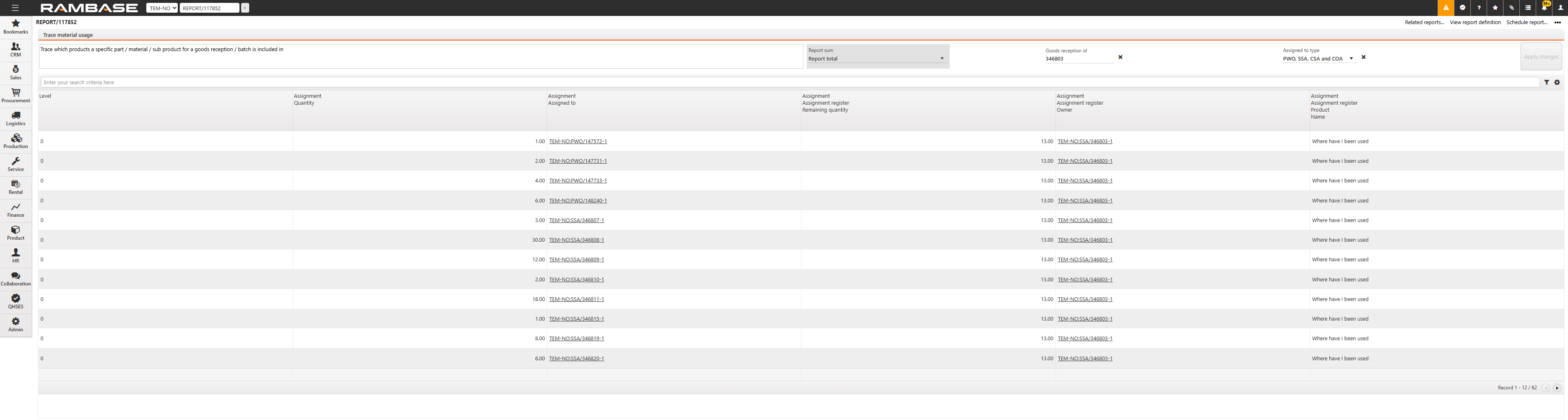
Header
In the header or the Trace material usage report, there is a description of the reports function. [WHAT IS THE FUNCTION OF REPORT SUM].
Enter the Goods reception id (SSAITEM) of an item. Use the Assigned to type dropdown menu to choose the desired link identifier. The following combination of types are available from the dropdown menu:
Production work order (PWO)
Goods reception item (SSAITEM)
Production work order (PWO) and Goods reception item (SSAITEM)
Production work order (PWO), Goods reception item (SSAITEM), Shipping advice (CSA), and Sales order (COA)
Goods reception item (SSAITEM), Shipping advice (CSA), and Sales order (COA)
Production work order (PWO), Goods reception item (SSAITEM), Shipping advice (CSA), Sales order (COA), and Stock correction (SAW)
Main content
Column | Description |
|---|---|
Level | Displays the tree level of the part. |
Assignment Quantity | Displays the quantity of the part. |
Assignment Assigned to | Displays the document type the part is assigned to. |
Assignment Assignment register Remaining quantity | Displays the remaining quantity of the part. If the part is of object type purchase order, purchase order response, or production work order, the remaining quantity will decrease when is forwarded from the object. If the part is of object type goods reception, the remaining quantity will be decreased when goods from this object is shipped |
Assignment Assignment register Owner | Displays the part. |
Assignment Assignment register Product Name | Displays the name of the part |