Delivery Performance Statistics (DPS)
To start the application, write DPS in the program field and press ENTER.
Delivery performance statistic (DPS) shows measurements of how you deliver to your customers and how your suppliers deliver to you. Delivery performance is measured both towards requested delivery dates and confirmed delivery dates.
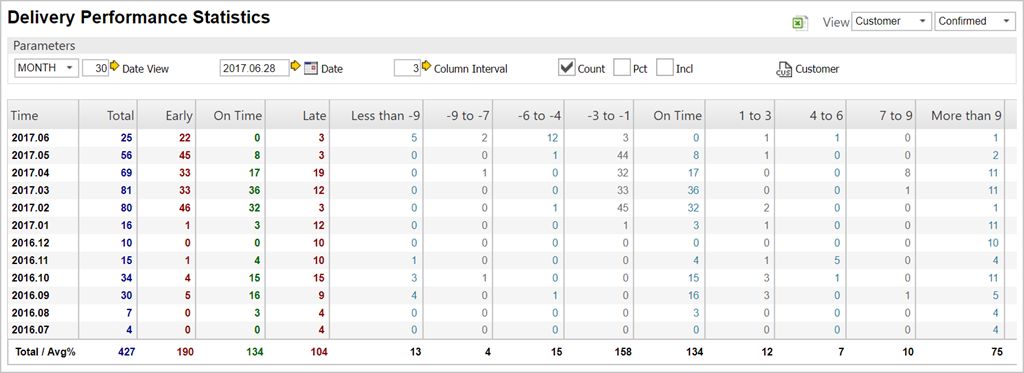
Column descriptions
Time - This column shows the date intervals.
Total - The blue column shows the total amount of deliveries in the defined interval.
Early - The red column contains information regarding all early deliveries.
On time - The green column lists all deliveries that have been on time.
Late - The last static column, which is also red, shows all the deliveries that has exceeded their delivery date and is listed as late.
The rest of the columns are dynamic and shows detailed information on deliveries by the user-defined parameters set in the parameters-box.
Field descriptions
Column Interval - The Column Interval field indicates the interval used by the detail columns below, with a default set to 3 days.
Count checkbox - This checkbox gives the user the opportunity to show, or hide, the totals.
Pct Checkbox - This checkbox enables the percentage of delivery differences to be shown.
Incl Checkbox - This option ebables the user to filter non-confirmed and non-requested shipping documents.
The first column in the application is showing the date intervals.
The blue column is the total number of deliveries.
The green column is showing statistics about deliveries done on time.
The red columns contains information about early and late deliveries.
The remaining columns in the application are showing detailed information about deliveries, based on a given day interval.
Abbreviations used
SHIPMENTDATE – Registration date from WBO. If no WBO is found, it is Registration date from CSA.
RECEPTIONDATE – The date which is first of Registration date in SSA and Registration date in WBI.
CONF – Confirmed delivery date.
REQ – Requested delivery date.
DELIVERYDATEREQ – An imaginary delivery date calculated based on REQ.
DELIVERYDATECONF – An imaginary delivery date calculated based on CONF.
Select your view
As view you can select if you want to see delivery performance for deliveries to customers or from suppliers. Based on your selection, the application will show performance for either Shipping advice (CSA) item or Goods reception (SSA) item. Also select if you want to see the numbers based on confirmed or requested delivery dates.
You can select to see data per year, quarter, month, week, day interval or day. If you select day interval, you can specify interval in the field at the right of the dropdown. An end-date for the data may also be selected.
Column Interval is used to specify number of days for the columns furthest to the right in the table.
You can select ‘Count’ to see number of items, and ‘Pct’ to view the percentage of orders which are delivered too early, on time, and too late. If you click the checkbox ‘Incl’, also Shipping adviced (CSA) items and Good reception (SSA) items that are measured based on orders without at confirmed delivery date is shown.
And you may select to see data for a specific customer/supplier, or all customers/suppliers. Clicking on any number in the table will bring you into “DPSITEMS’ application which shows you the details. If number of days are presented as negative, it indicates to early delivery. Positive number of days indicates to late delivery.
When is delivery performance calculated?
Delivery performance is calculated every night by a batch job and stored in shipping advice (CSA) and goods reception (SSA) items.
Delivery performance towards customers
Which orders are calculated?
Delivery performance is calculated for shipping advise (CSA) item if:
it is shipped (status higher than 3)
location is not equal to ‘XXX’
it isnot of type ‘Rental’
it is not of type ‘ Material for project order’
type of product is not ‘Expenses’ (X)
How is delivery performance calculated?
The program loops backward in the order flow process from shipping advice (CSA) item to sales order (COA) item(s), to find a REQ, CONF and ‘Registration date’ to use. REQ will be found from the the latest COA item that has ‘Change caused by Customer’.
CONF will be found from the latest COA item that has ‘Change caused by Us’ and a confirmed delivery date. If no CONF can be identified, the calculation will instead use REQ as CONF. If neither a REQ can be identified, it will be understood as item is delivered ‘On time’.
Two imaginary delivery dates will be calculated. One is calculated based on REQ (DELIVERYDATEREQ) and one is based on CONF (DELIVERYDATECONF). This calculation will take ‘Shipping day’, ‘Ship based on confirmed date’ and ‘Only ship entire order’ from CSA in to account (fields are not visible in CSA application, but they have the same values as the COA it was created from). If they cannot be found from the CSA, the defaults from the related customer will be used.
If no ‘Shipping day’ can not be found at all, the REQ and CONF dates which have been found will be used to calculate the imaginary delivery dates.
If ‘Ship based on confirmed date’ is ‘Yes’, DELIVERYDATEREQ is set equal to ‘DELIVERYDATECONF’.
However, DELIVERYDATEREQ is set equal to ‘Registration date’ of the COA where REQ is read from if it is calculated as an earlier date than this. DELIVERYDATECONF is set equal to ‘Registration date’ of the COA where CONF is read from if it’s calculated as an earlier date than this.
Delivery performance based on requested delivery date is calculated as ‘SHIPMENTDATE’ minus ‘DELIVERYDATEREQ’.
Delivery performance based on confirmed delivery date is calculated as ‘SHIPMENTDATE’ minus ‘DELIVERYDATECONF’.
If ‘Only ship entire orders“ is ‘Yes’, delivery performance will only be calculated for the first item. The other items will be set as they are delivered on time.
Delivery performance from suppliers
Which orders are calculated?
Delivery performance is calculated for goods reception (SSA) item if:
it has been registered in as stock (status higher than 2)
location is not equal to ‘XXX’
it is an ordinary goods reception and not of a special type
type of product is not ‘Expenses’ (X)
How is delivery performance calculated?
The program loops backward in the order flow process from SSA item to SOA and SPO item(s) to find a REQ and a CONF to use.
REQ is found from the latest SOA item that has “Changed by us’. If such SOA item cannot be found, REQ is found from the SPO item.
CONF is found from the latest SOA item which has “Changed by us’ and which has a confirmed delivery date. If no CONF can be identified, the calculation will instead use REQ as CONF. If neither a REQ can be identified, it will be understood as item is delivered on time.
Delivery performance based on requested delivery date is calculated as ‘RECEPTIONDATE’ minus ‘REQ’.
Delivery performance based on confirmed delivery date is calculated as ‘RECEPTIONDATE’ – ‘CONF’.
However, if the SSA item has been created from a purchase order response (SOA) item which doesn’t origin from a purchase order (SPO), delivery is to be understood as it is on time.