Shared products (SPR)
Shared products is a solution that allows several companies within the same system to share their Products (ART) with each others through the Shared product (SPR) application. The application contains three tabs: Shared products, Shared product publisher and Shared product subscription which provide access to the different parts of shared products.
Each company can decide which Products (ART) they want to share with other companies by publishing them. Likewise, companies can choose which shared products from other companies they want to use in their own company by subscribing to them. A product can be created and activated in the source company and then published using the Publish product. Once published, the product becomes available in Shared products and can be used by other companies. A local product can also be created from a shared product. To do so, you must be logged in to the company where you want the local product to be created.
The shared product keeps the same product ID across the companies that use it.
Note
To use the shared products solution, the companies must have synchronized sequence numbers in the Product (ART) archive. Companies that were established in RamBase before 1st of April 2025 do not have this synchronization. In addition,the companies must have a common Manufacturer and Unit archive.
Also the Company setting (CSV), Allow for using shared products must be enabled by RamBase personnel. If this setting is not enabled, Shared Products cannot be used and an error will occur. If you wonder if the solution for shared products can be used by your company, you should therefor contact RamBase servicedesk.
Purpose of shared products
Shared Products allows companies within the same group to share products, while each company has its own Product (ART) archive.
For example, one company can create and publish a product, while other companies can choose to receive and use the product in their own Product (ART) archive. Companies can also configure subscriptions so that relevant products are received automatically.
The same product can be represented by different product types in different companies. This makes it possible for companies with different business processes to use the same shared product according to their own needs.
Shared products area
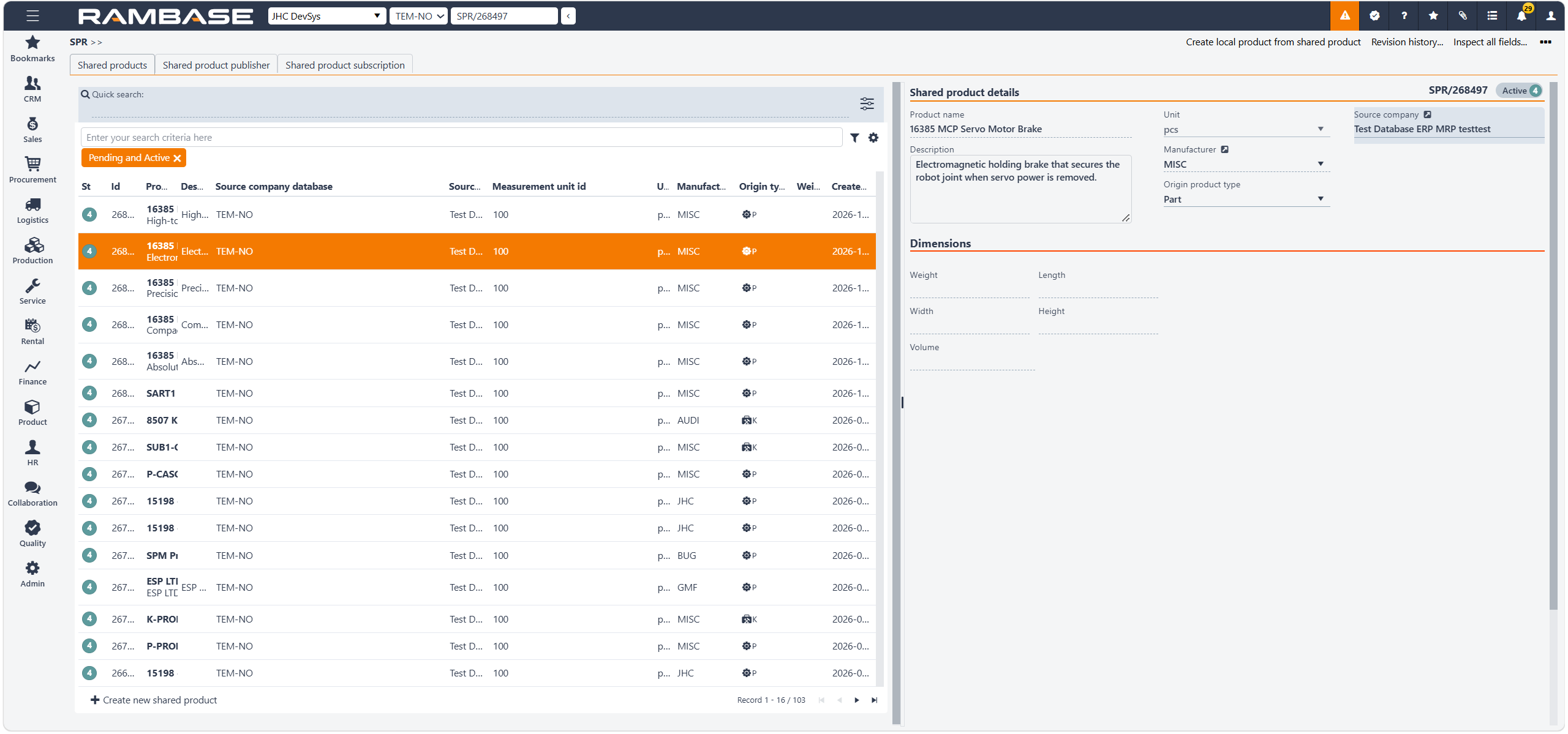
It shows Products (ART) that have been shared from another company system and are available for use in your company.
You can:
Search for shared products
View their details
Check their status
Create a local product based on a shared product
Columns | Description |
|---|---|
St | Status of the shared products |
Id | Shared products identifier |
Product | Name of Product (ART) |
Description | The origin description of the product |
Source company id | Company identifier |
Source company database | The database/system from which the shared product information originates |
Source company name | The company that provides or owns the shared product information |
Measurement unit id | Measurement unit identifier |
Unit | The unit of measurement used for the product |
Manufacturer id | Manufacturer identifier |
Manufacturer name | The name of the company/manufacturer that produces the product |
Origin type | The origin type of the product. The initial value when uploaded from other company or when created directly in shared products |
Weight | The weight of the product in kilograms |
Created at | Date and time of creation |
The company you are currently working in does not affect how the Shared products application is displayed or used. However, when you create a local product from a shared product, you must be in the company where you want the local product to be created.
Shared products details area
Shared products contain information that originates from the source company. Most information cannot be changed locally in a company that uses the shared product.
Columns | Description |
|---|---|
Product name | The name or identifier of the shared product. This identifies which product the shared product record represents. |
Description | Additional information or a detailed description of the product. |
Unit | The unit in which the product is handled or measured, for example pcs (pieces). |
Manufacturer | The manufacturer associated with the product. |
Origin product type | Shows the product type of the product in the source system. In this example, the product is a Kit. |
Source company | Shows which company is the source of the shared product information. |
Dimensions
Weight - The weight of the product.
Length - The length of the product.
Width - The width of the product.
Height - The height of the product.
Volume - The volume of the product, based on its dimensions or the value provided by the source.
Shared product publisher (SPP)
Shared product publisher (SPP) is used to configure which local products a company automatically publish as as shared product that will be available for other companies. This can be controlled at product type level.
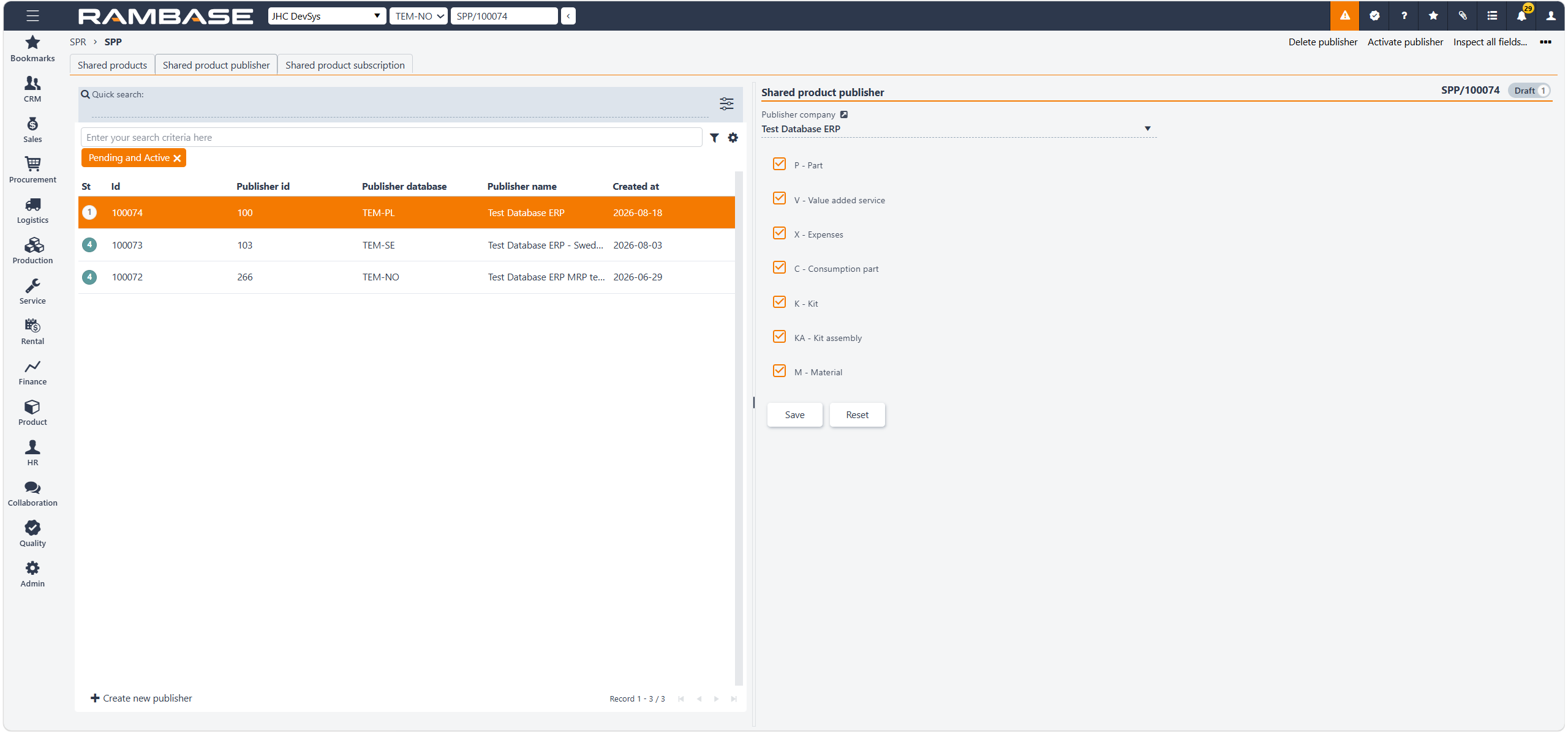
Shared product publisher overview
The left side of the page displays existing publishers. Select a publisher to view or edit its configuration on the right. Use Quick search to find a specific publisher. The filter can be used to limit the list to publishers with specific statuses, such as Pending and Active.
Columns | Description |
|---|---|
St | Status of the shared product publisher |
Id | Shared product publisher identifier |
Publisher id | Company idenifier |
Publisher database | The database associated with the publisher |
Publisher name | The name of the company that publishes the shared products |
Created at | Date and time of creation |
Click Create new publisher at the bottom of the left-hand panel to create a new publisher.
When creating a publisher:
Select the Publisher company.
Select the product types that should be available for sharing.
Click Save.
The publisher can then be used as the basis for sharing products with subscribing companies.
Shared product publisher details
The right side of the page displays the configuration for the selected publisher.
Publisher company - Publisher company identifies the company that publishes the products. This is the company whose products are made available as shared products to other companies.
The checkboxes determine which product types can be published as shared products. The available product types are:
P -Part
V - Value added service
X - Expenses
C - Consumption part
K - Kit
KA - Kit assembly
M - Material
Select the product types that should be included in the publisher.
For example, if Kit and Material are selected, products of those types can be included when products are published through this publisher. Click Save to save changes to the publisher configuration or click Reset to discard changes that have been made since the last save and restore the previously saved configuration.
Shared product subscription (SPS)
Shared product subscription (SPS) is used to configure which products that are shared from a source company that will automatically be created locally in other companies. This can be controlled by product type level.
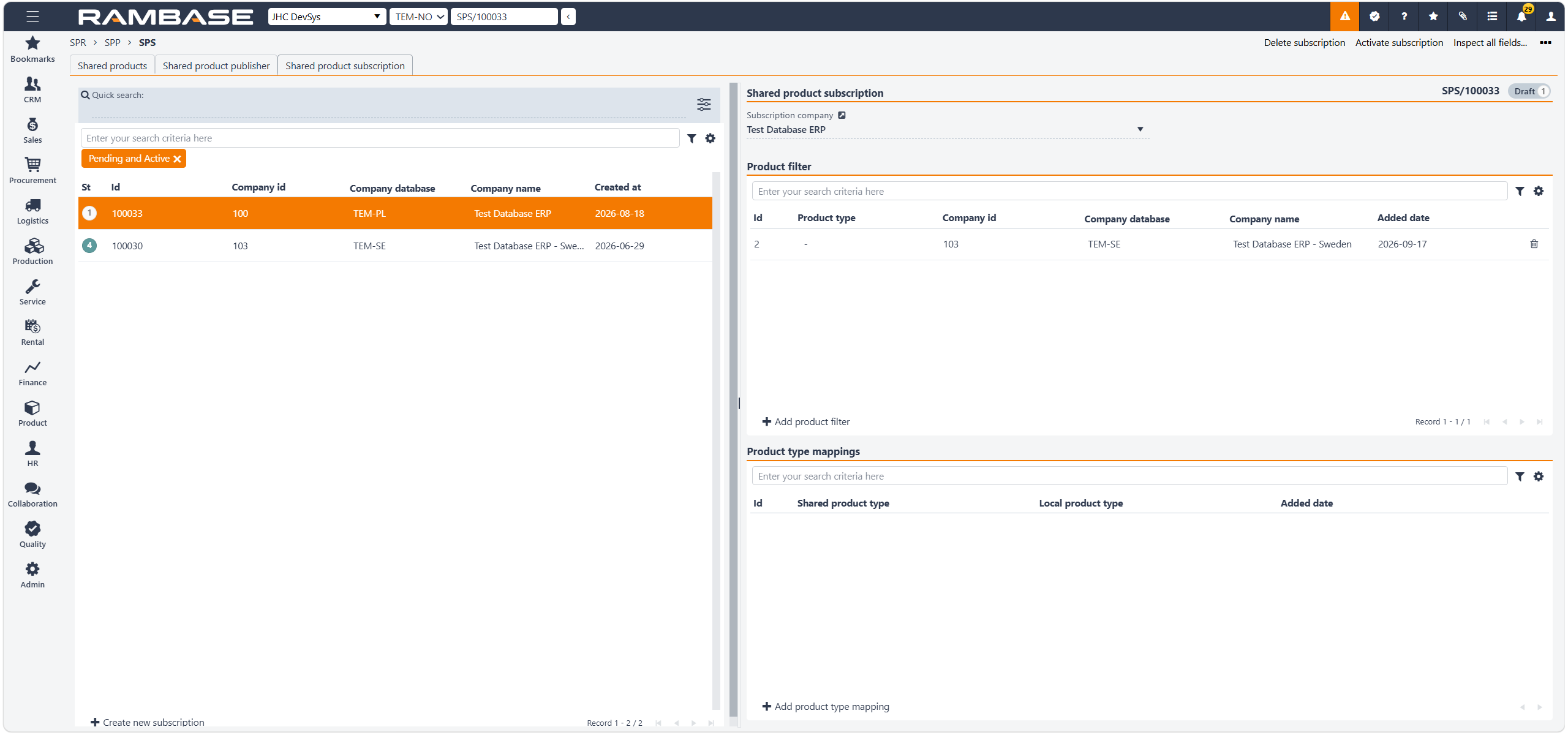
Shared product subscription overview
The left side of the application displays existing subscriptions. Here you can select a subscription to view and maintain its configuration on the right. Use Quick search to search for a specific subscription or use the filter to limit the list based on the subscription status.
Columns | Description |
|---|---|
St | Status of the shared product subscription |
Id | Shared product subscription identifier |
Company id | Company identifier |
Company database | Abbreviation/code to identify the company |
Company name | Name of the company |
Created at | Date and time of creation |
Shared product subscription details
The right side of the application contains the configuration for the selected subscription.
Product filter
The Product filter section defines which products from the selected source companies should be received through the subscription. The section contains a list of product filters.
Columns | Description |
|---|---|
Id | Product filter identifier |
Product type | Product type that is subscribed (filtered on) |
Company id | Company identifier |
Company database | Abbreviation/code to identify the company |
Company name | Name of the company |
Added date | Date and time of creation |
Product type mappings
The Product type mappings section defines how a product type subscribed from another company is mapped to a product type in the local company. This is important because the shared product type and the local product type do not necessarily have to be the same. The actual mappings depend on the product types used by the companies involved.
Columns | Description |
|---|---|
Id | Product type mapping identifier |
Shared product type | Shared product type, the one being copied from |
Local product type | Local product type, the product type you want the product to have locally |
Added at | Date and time of creation |