Confidential type (CFT) application
A Confidential type (CFT) is used to classify suppliers and invoices as confidential. When a supplier is assigned a Confidential type (CFT), new invoices connected to that supplier will automatically inherit the confidentiality setting. Confidential types (CFT) are managed through the dedicated Confidentiality type (CFT) application. The configuration is centralized, meaning that users cannot assign or maintain confidentiality settings directly from the supplier screen itself. Instead, all setup and maintenance must be performed within the Confidential type (CFT) application.
A Confidential type (CFT) can represent different kinds of restricted information depending on the organization’s requirements. Typical examples could include classifications such as financial sensitive, legal confidential, HR restricted, or internal only.
Navigate to the application
Click the Program field and type "CFT" and press ENTER.
Click here to read more about the user interface.
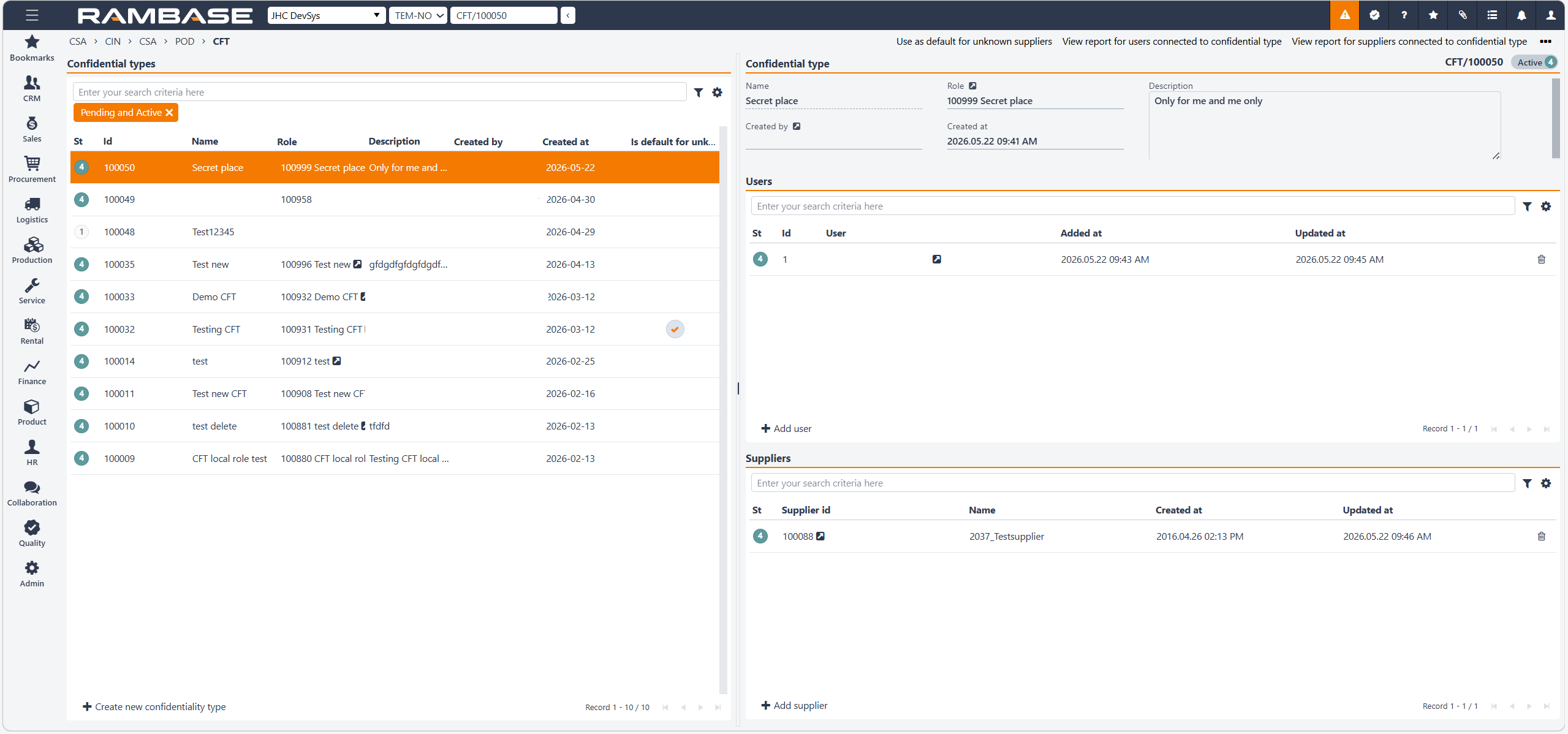
Confidential types area
The Confidential types area is filter based and can list all intended Confidential types (CFT).
The header includes a Search field, the Filter builder icon and the Column settings icon.
Columns | Description |
|---|---|
St | Confidential type status
|
Id | Confidential type identifier |
Name | Name of confidential type |
Role | Role identifier |
Description | Description of confidential type |
Created by | Who the confidential type was created by |
Created at | Date and time of creation |
Is default for unknown suppliers | Marks if the confidential type is the default for incoming invoices that does not have a supplier set |
Create new confidentiality type button - To create a new confidential type, click on the Create new confidentiality type button and insert a name and description in the Name and Description fields. When done, click Create.
Confidential type area
Name field -Name of the confidential type
Role - Role identifier
Created by - Who the confidential type was created by
Created at - Date and time of creation
Description text-box - Description of confidential type.
Users area
The ability to create, assign, modify, or remove Confidential type (CFT) is typically controlled through user permissions. Not all users will necessarily have access to perform these actions. Before a Confidential type (CFT) can be activated to status 4, a user can/should be assigned to the invoice.
A user with sufficient permissions can open an invoice and either change the Confidential type (CFT) to another classification or remove the classification entirely. This means that even if a supplier automatically applies a confidentiality setting, the invoice itself can still be adjusted manually when necessary.
The discussion confirmed that removing a Confidential type (CFT) from an invoice is fully supported. To do this, the user simply clears the Confidential type (CFT) field and saves the invoice. Once updated, the invoice is no longer classified under that confidentiality category.
Although invoice confidentiality can be assigned automatically, the system also allows authorized users to manually override the classification on individual invoices. This provides flexibility in situations where an invoice requires a different confidentiality level than the default supplier configuration.
This functionality is useful in situations where a confidential supplier occasionally sends invoices that should not be restricted, or when a confidentiality assignment was applied incorrectly.
Columns | Description |
|---|---|
St | Status for the user assignments |
Id | User assignment identifier |
User | Name of user |
Added at | Date and time of creation |
Updated at | Date and time of update |
Add user button - Clicking the Add user button opens a popup window that allows the user to search for and add users.
Automatic user assignment using Company settings (CSV)
Users can also be added automatically to a Confidential type (CFT) through the Company setting (CSV), Automatically add role to the confidential type.
The Company setting (CSV) specifies the roles that are used as the source for identifying users. For example, if the Finance Manager role is specified, the users assigned to that role will be added to the Confidential type (CFT). If several roles are specified, users from all of the specified roles will be added.
The system no longer creates or uses a separate local role to hold these users. The roles specified in the Company setting (CSV) are used only to identify which users should be copied to the Confidential type (CFT).
User synchronization
The users configured through the Company setting (CSV) are synchronized once per day. The synchronization checks whether the users in the configured roles have changed and updates the users assigned to the Confidential type (CFT) accordingly.
The synchronization also runs for the specific confidential type when the Confidential type (CFT) is activated.A field in the Confidential type (CFT) table identifies users that have been added through the Company setting (CSV) synchronization. This information is used during subsequent synchronization to identify and maintain users that were added automatically.
All users assigned to the Confidential type (CFT), including users added through the Company setting (CSV), are stored in the Confidential type (CFT) Users tab.
This replaces the previous approach where a separate local role was created to contain the users.
Suppliers area
Suppliers themselves cannot be configured directly from the supplier interface when it comes to confidentiality. A Confidential type (CFT) must be activated to Status 4 before suppliers can be assigned to it. Within the Confidential type (CFT) application, the user searches for the supplier and assigns the relevant confidentiality classification. Once the configuration is saved, the supplier becomes linked to that Confidential type (CFT). After a supplier has been assigned a Confidential type (CFT), all new invoices received from that supplier automatically inherit the same confidentiality classification.
This happens by default during invoice creation or import and ensures that sensitive invoices are protected without requiring users to classify every invoice manually.
The automatic behavior only applies to future invoices. Existing or historical invoices are not updated retroactively when a Confidential type (CFT) is added to a Supplier (SUP). If invoices already existed before the supplier received its confidentiality classification, those invoices remain unchanged.
Columns | Description |
|---|---|
St | Status of supplier:
|
Supplier id | RamBase supplier identifier |
Name | Name of supplier (name of company or lastname/familyname) |
Created at | Date and time of creation |
Updated at | Date and time of update |
Add supplier button - Clicking the Add supplier button opens a popup window that allows the user to search for and add suppliers.
Tip
The default role for Confidential type (CFT) is Finance Manager.