[en] The Rental item check-out (RIO) application
[en] Navigate to the application
[en] Option 1: RamBase menu → Rental → Rental contract → Rental item check-out
[en] Option 2: Click the Program field and type "RIO" and press ENTER.
[en] Click here to read more about the user interface.
[en] Overview
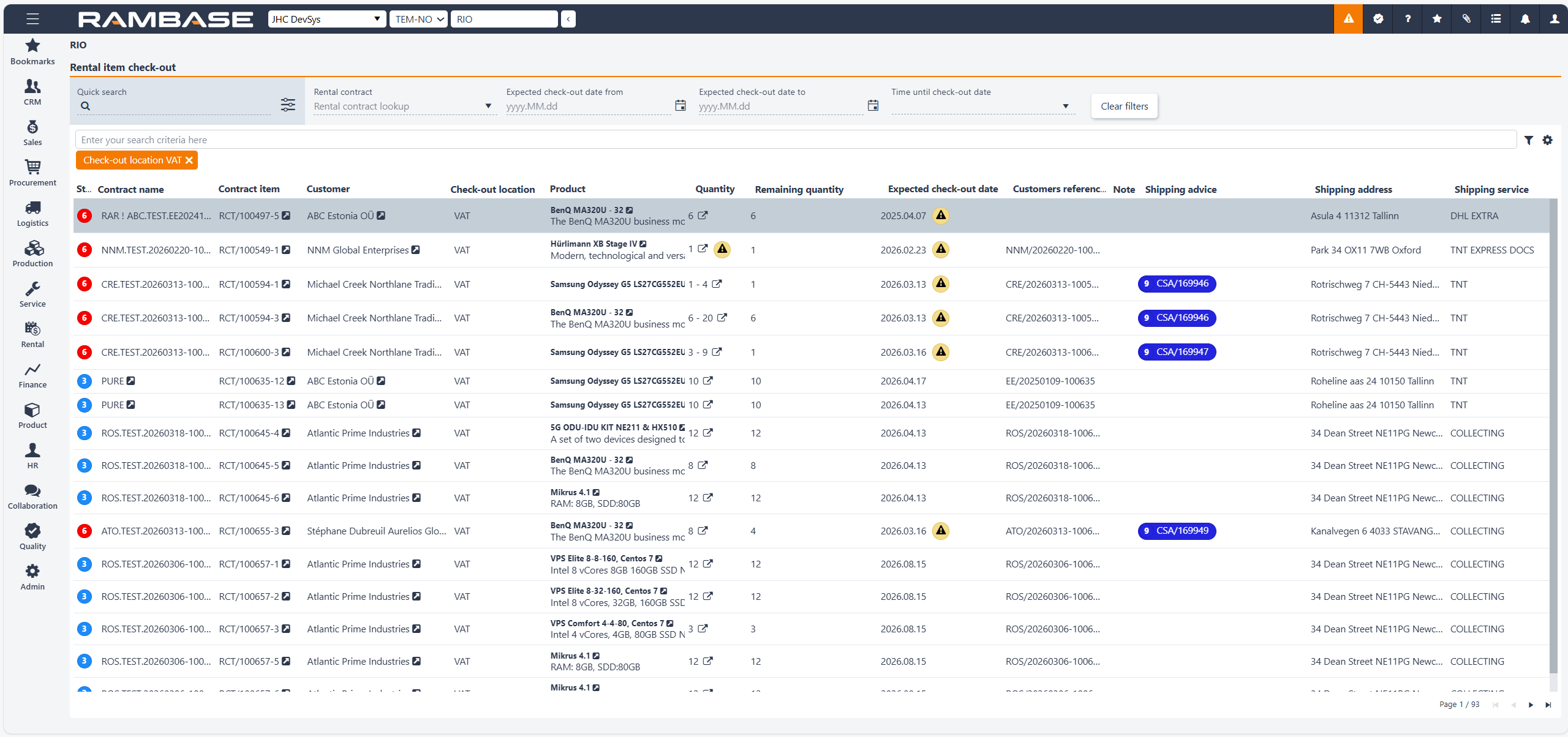
[en] The Rental item check-out (RIO) application provides an overview of rental and subscription data, allowing users to track both physical rental items and non-physical subscription items in one place. It displays key information related to contracts, quantities, and rental periods, helping monitor ongoing and overdue rentals.
[en] Header
[en] List
[en] Header
[en] The Header area contains the application's options for quick search, the option to filter on a specific rental contract, expected check-out date from, expected check-out date to and time until check-out date.
[en] Quick search field and icon - The Quick search field allows for the inclusion or exclusion parameters. Click the Quick search icon to enable or disable the optional parameters.

[en] Quick search icon
[en] Optional search parameters[en] Product name
[en] Product description
[en] Customer
[en] Customers reference no
[en] Rental contract - In the popup list, click on a specific Rental contract (RCT) to get an overview.
[en] Expected check-out date from field and icon - To filter on a Rental overview (RCT) with expected check out date from, type or select a date by clicking the Calendar icon.

[en] Calendar icon
[en] Expected check-out date to field and icon - To filter on a Rental overview (RCT) with expected check out date from, type or select a date by clicking the Calendar icon.
[en] Time until check-out date - This option provides a quick way to define the checkout date range. Based on your selection, for example 7 days, 14 days or 21 days, the system automatically sets the start date to today and the end date according to the chosen time period.
[en] Grid/List
[en] The list includes standard RamBase search and filtering options which you can read more about in the tip box below.
[en] Search field, filter builder and column settings
[en] The header contains multiple options to filter the list:
[en] Open items and order item - To filter the list on Rental overviews (RCT)
[en] Column | [en] Icon | [en] Description |
|---|---|---|
[en] Status | [en] Displays the current stage of the Rental overview (RCT). [en] Potential statuses are:
| |
[en] Contract name | [en] Short description for the rental contract. | |
[en] Contract item |
| [en] Displays the Rental contract item identifier (RCTITEM).
|
[en] Customer |
| [en] Displays the name of the Customer (CUS). [en] To view and/or edit details, click the View icon to open the Customer (CUS) application. |
[en] Check-out location | [en] Displays the potential three letter abbreviation of the Location (LOC) where the Rental unit (RUT) is expected to be checked in. | |
[en] Product |
| [en] Displays the name and description of the Product (ART) which applies to the Rental unit (RUT). [en] To open the Product (ART) application, click the View icon. |
[en] Product collection | [en] The product collection that the product belongs to. | |
[en] Quantity | [en] Number of units ordered. | |
[en] Remaining quantity | [en] Quantity of Rental units (RUT) that haven't been shipped yet. | |
[en] Expected check-out date |
| [en] Displays the date which the asset is expected to be shipped. [en] If the expected check-out date for the rental unit is significantly delayed/overdue a warning icon will be present in the column. |
[en] Customer reference no. | [en] Displays the customers reference number. E.g. the sales order identifier the customer might use in their internal system. | |
[en] Note | [en] Internal note for the contract item. | |
[en] Shipping advice id. |
| [en] Displays the shipping advice item that this unit was shipped out on. [en] To view and edit details, click the View icon to open the Shipping advice item (CSAITEM) application. |
[en] Shipping address | [en] Address reference. | |
[en] Shipping service | [en] Name of shipping service. |